
Easy Eject for Mac
Import. Clean.
Eject. Done.
Bring your footage home, then get your cards ready to go. A free native Mac utility for drone imports, camera cards, and one-click ejects.
Version 1.5.1 · macOS 14+ · Apple silicon & Intel
Free. No ads. No tracking. Signed and notarized.
A little less work between shoots
From plugged in to ready to unplug.
Import your footage
Connect an enrolled air unit or camera card. Save its files into dated folders and watch the current phase and percentage in your menu bar.
Clean your cards
Remove hidden Mac metadata that can show up as unwanted files on Windows drives or phantom games on emulation cards.
Eject with a click
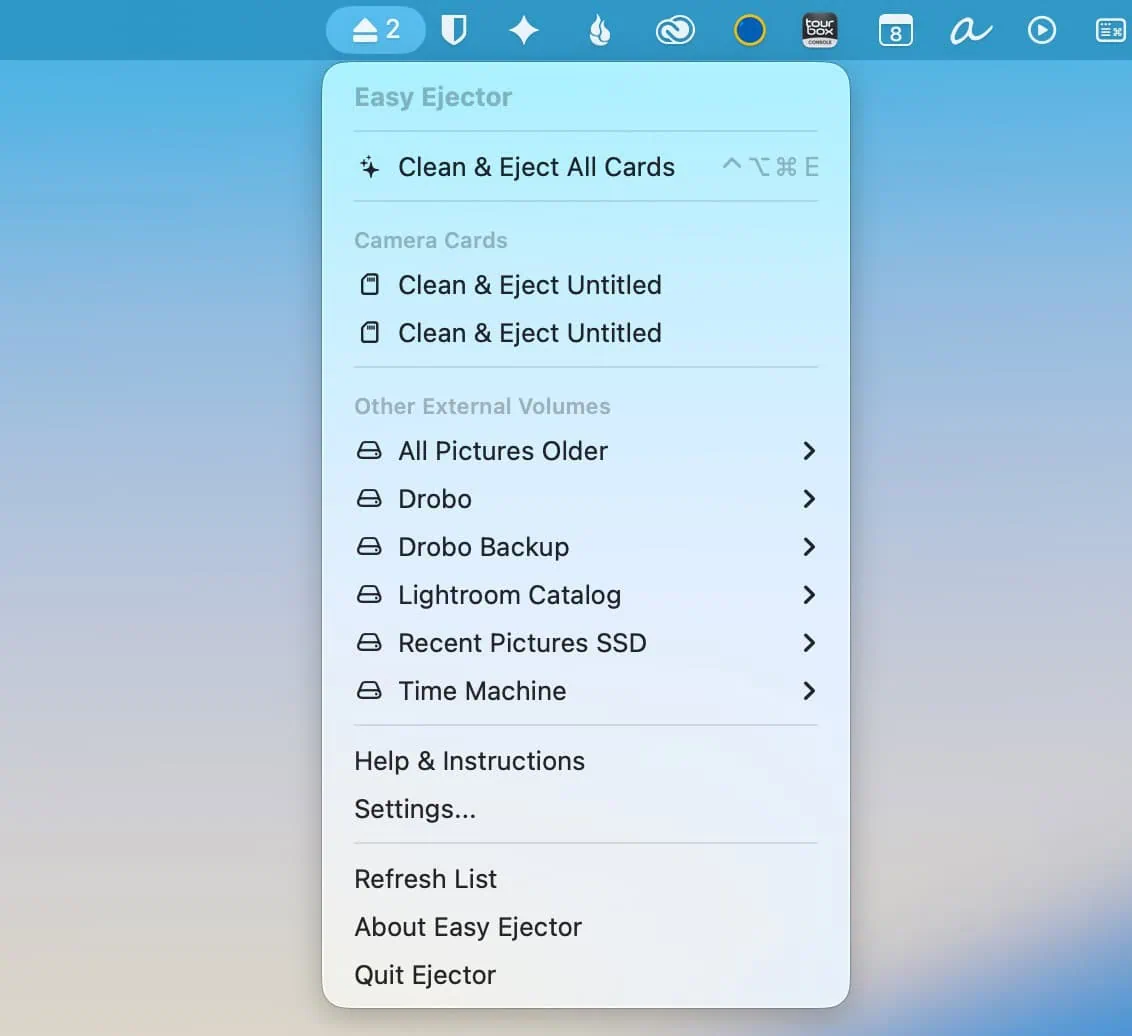
Eject SD, CFexpress, and XQD camera cards from the menu, or use a global keyboard shortcut. Imports can eject automatically when finished.
New in version 1.5
Automatic imports.
Verified copies.
Built for the next flight, shoot, or full memory card. Give each device its own import profile, then let Easy Eject handle the repeat work.
Read the release notesA folder for every day
Files go into
YYYY-MM-DDfolders, keeping the paths inside your selected media folder. Matching copies are reused; filename conflicts preserve both versions.Keep originals, or free up space
Originals stay on the device by default. Optional deletion happens only after the saved copy passes SHA-256 verification and storage flush checks.
Recover device Trash
Optionally save files from your Trash on that device into Recovered Device Trash before clearing them. Other drives’ Trash stays untouched.
Know when it is finished
See the current file, progress, and result. Automatic eject runs only after a successful import. An error stops automatic ejection and appears in the import window.
Still your everyday eject button
Camera cards.
Without the Finder detour.
CFexpress cards can appear to macOS as external SSDs, so some editing apps do not offer automatic ejection. Easy Eject combines hardware information with common camera folders to group likely camera cards.
Review the list before bulk ejecting: a backup drive containing camera folders can also match. Active import source and destination disks are protected from Easy Eject’s manual and bulk eject actions.
⌃⌥⌘EOne shortcut. Your camera cards ejected.
Choose your preferred letter in Settings.
A cleaner card for your next device.
Clean & Eject removes known macOS metadata before unmounting:
._*AppleDouble files.DS_Storefolder settings.apdiskmetadata- Empty
__MACOSXfolders
Unrelated contents are preserved. Ordinary cleanup skips protected system folders such as .Spotlight-V100, .Trashes, and .fseventsd. Device Trash recovery is a separate import setting.
Get started
A few choices. Then just connect.
Install Easy Eject
Download the disk image, open it, and drag Easy Eject into Applications. Quit an older copy before replacing it. Open the app and look for its eject icon in your menu bar.
Choose a device and destination
Open Air Unit & Camera Imports. Under Add an import device, select a connected device and choose Set up import, and select its recording folder, such as
DCIMorVIDEO. Choose a destination on a different disk.Make it your workflow
Save the profile and use Import now, or enable automatic import for the next connection. Original deletion and Trash recovery are separate choices. Enable Launch at Login to keep the app ready after sign-in.
Keep your Mac awake, Easy Eject running, and the destination drive connected. After formatting a source device, enroll it again.
Which drones and air units can I use?
The device must mount as a readable drive in Finder, through USB storage mode or a card reader. DJI O4 importing, verification, deletion, and automatic ejection have been tested. DJI O3 and other air units can use profiles when they expose readable storage, but every model has not been tested.
Devices that appear only in Image Capture, PTP, or MTP mode are not supported by this version.
What files are imported?
Every regular file inside the media folder you choose, including video, camera RAW, proxy, and sidecar files, even with unfamiliar extensions. Normal imports skip hidden files and folders and do not follow symbolic links.
Will Easy Eject delete my originals?
Only if you enable that option for the device. Deletion is permanent and follows verification of each saved copy. Stop import preserves unverified originals, but completed files may already have been removed if deletion was enabled.
Keep backups of important media. Hardware failure, other apps, or unplugging a device can still interrupt a transfer. The import window’s Show import log button opens the file-by-file record.
Which macOS permissions do I need?
Normal imports use the folders you select. Full Disk Access is needed for protected locations such as device Trash, and may be needed when macOS denies access during cleanup.
Accessibility is optional and needed for the global keyboard shortcut. Manual menu actions work without it.
For either permission, open System Settings → Privacy & Security, choose the permission, and enable Easy Eject. If missing, use the + button to add it from Applications. Follow macOS’s Quit & Reopen prompt when shown.
Why download directly instead of from the App Store?
Easy Eject is distributed through GitHub releases. Downloads are signed with Ryan Smith Photography’s Developer ID and notarized by Apple. Notarization is an automated security check, not a guarantee against every bug.
Version 1.5.1 includes Apple silicon and Intel builds and requires macOS 14 or later. Intel and macOS 14 runtime testing has not been completed.
Is Easy Eject free?
Yes. Easy Eject is freeware with no ads or tracking. If it helps your workflow, you can buy Ryan a coffee to support development.
Use at your own risk. The developer is not responsible for data loss. Always maintain backups of important files.
Built by a photographer who needed it.
I made Easy Eject when my Sony A7RV’s CFexpress cards stopped working with my usual eject-after-import workflow. The new importer grew out of flying an FPV air unit with limited storage. I wanted to connect it, save the footage, see the progress, and know when it was ready to unplug.